Your first session
Your first session
Start in a disposable test world using the current development build. The compatibility page lists the remaining playtest limits.
Make the equipment
Gather wood, Iron Bars, Copper Bars and Light Leather. The crafting guide lists quantities and the base-game material routes.
At a Workbench, craft one Optimus Assembly Dock. Place it with standing room nearby, open it and select Robotics. Craft one Fleet Remote and two Optimus Deployment Units for a first fleet of two robots.
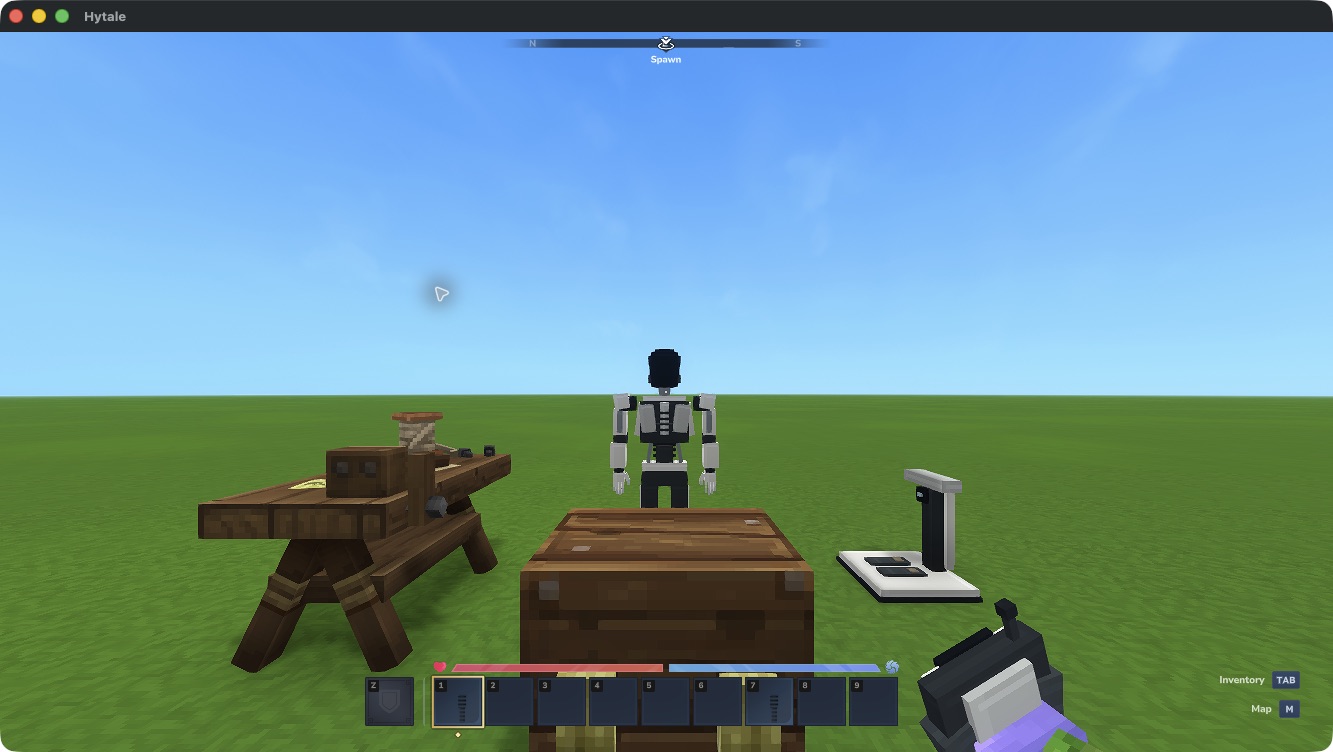
Workbench on the left, storage Chest in the centre, Assembly Dock on the right and a deployed Optimus behind them.
Deploy and link
- Hold a deployment unit and aim at clear ground within 5 blocks.
- Use the item’s secondary action to deploy one robot. Successful deployment consumes one unit; a refused placement keeps it.
- Hold the Fleet Remote and use its secondary action while looking at your robot within 5 blocks. First use binds the remote to you and this world.
- Deploy the second robot and link it using the same remote. Both appear in its roster.
A robot already linked to another remote must be unlinked first. Fleet and controls explains switching links.
Take control and return
Use the remote to open its roster and choose Assume control beside a ready robot within 128 blocks of your body or reachable through your linked Range Extenders. Choose a safe place for your body: it remains exposed while you are away.
Open the inventory to equip the robot from its own storage. Hotbar slots 2–9 hold equipment; slot 1 always provides Release Control during possession. Select slot 1 using your hotbar bindings, normally 1, then right-click to return to your body. Selecting or scrolling onto slot 1 alone keeps you in control. /optimus-release is also available.
Use the normal movement, look, jump and item bindings while testing the robot. Keep within direct range or a connected mast route, and release control before leaving the world. Return to the remote and assume the other robot to switch loadouts. Each keeps its own equipment and storage.
See Inventory and recovery if you lose a remote or need space for the release control.