Using the ray
Choose a size, then choose a target
| Control | Action |
|---|---|
| Primary | Fire at one visible living target within 16 blocks |
| Secondary | Open the Shrinkium controls |
| 75% / 50% / 25% | Select an absolute fraction of the captured original size |
| RESTORE ORIGINAL | Select paid restoration for the next ray activation |
| SELF | Apply the selected size or restoration mode to yourself |
| CLOSE | Leave the panel and aim normally |
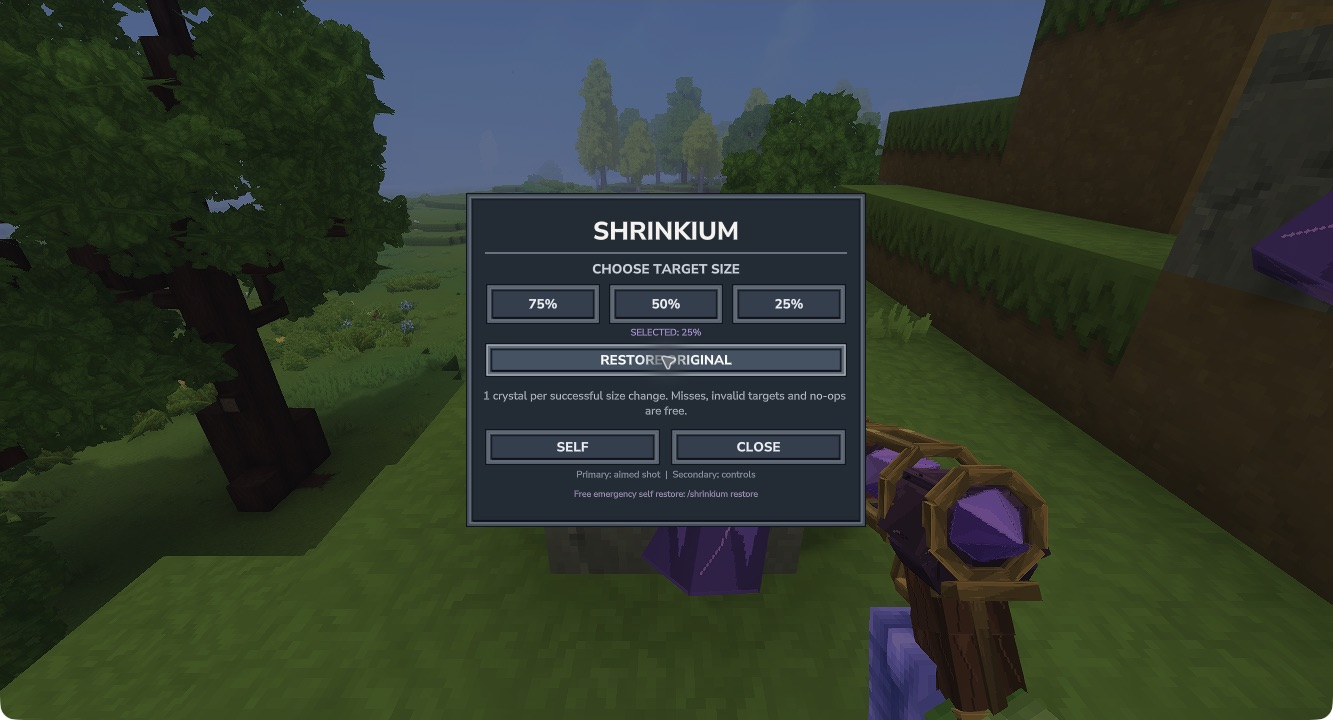
Native Hytale 0.7.4: choose a size, use SELF, or select restoration for the next activation.
Charge rules
One crystal pays for one committed single-entity size change, including paid restoration. The size difference does not change the price. Crystals are taken from the hotbar or main inventory. Keep them there rather than in an external container.
Misses, invalid targets, same-size no-ops, busy transitions and blocked growth use no crystal. Walls limit the shot. Props, dead or teleporting entities, unsupported large baselines and targets controlled by a foreign scale effect are refused.
The size transition lasts about 0.85 seconds. Growth checks the space around the target and can pause when it becomes obstructed. The original baseline is captured once; setting 50% twice does not produce 25%. Repeated rapid input is not a way to stack sizes.
What to expect visually
The ray uses an open brass cage, a violet faceted reactor, copper coils and a walnut grip. The inventory/hotbar icon and native hand placement have been inspected on Hytale 0.7.4. Complete all-angle visual, audio and camera acceptance remains open. See troubleshooting if the held model disappears after restoration.